
Description
Professional WordPress email delivery management
SMTP + Log Viewer & Mail Safety is an all-in-one WordPress email management plugin providing reliable email delivery, automatic SMTP failover, complete email logging and intelligent Mail Safety monitoring.
Connect trusted providers including Brevo, SMTP2GO and Mailjet, use your own SMTP server, or continue using WordPress built-in mail delivery through PHPMailer.
Manage your email routing, delivery status, provider health, troubleshooting and email history from one powerful WordPress dashboard.
Designed for WooCommerce stores, business websites, agencies and developers who need reliable email delivery with full visibility and control.
Flexible setup with features you control
SMTP + Log Viewer & Mail Safety adapts to your needs.
Enable only the features you require:
• SMTP delivery management
• Email logging
• Usage monitoring
• Mail Safety protection
• Open tracking
• Debug tools
• Admin notifications
Use it as:
Logger only — Keep your existing WordPress email delivery and record every message sent.
SMTP + Logger — Route emails through your chosen providers and keep a complete delivery history.
SMTP only — Focus on reliable delivery while disabling email storage.
Automatic SMTP failover and reliable delivery
Email delivery problems can happen at any time. A provider may experience downtime, reject a message or reach its sending limit.
SMTP + Log Viewer & Mail Safety allows you to configure multiple delivery providers and automatically move to the next available provider when a failure occurs.
Create your own failover chain with up to five delivery positions:
• Primary provider
• Secondary provider
• Third provider
• Fourth provider
• Fifth provider
Each provider can have its own settings, priority, usage limits and status monitoring.
Test your failover chain before you need it.
Use the built-in failover test to simulate a primary provider failure and confirm that your backup provider successfully takes over.
Supported email providers
Built-in support includes:
• Brevo — API delivery with optional SMTP mode
• SMTP2GO — API delivery with optional SMTP mode
• Mailjet — API v3.1 delivery with optional SMTP mode
• Custom SMTP — connect almost any SMTP server
• WordPress built-in mail delivery (PHPMailer) — use your existing mail system
Each provider can have individual daily or monthly sending limits.
The plugin can monitor provider usage and automatically switch to the next provider when configured thresholds are reached.
Need support for another email provider? Contact me and I can look at adding compatibility.
Live provider status monitoring
See the health of your email delivery system at a glance.
The provider status panel shows:
• Connection status
• Active delivery provider
• Failover position
• Last successful send time
• Provider availability
Know which provider is currently handling email delivery and confirm that backup providers are ready when needed.
Complete email logging
Know exactly what happens to every email sent from your WordPress website.
The built-in email log records:
• Recipient
• Subject
• Delivery status
• Provider used
• Date and time sent
• Failure details
Search your email history, preview HTML messages, resend failed emails and quickly identify delivery problems.
Complete sender control
Control how your emails appear to recipients.
Configure:
• From Name
• From Email Address
• Reply-To Address
Each provider can have its own sender settings, giving you complete control when managing multiple delivery services.
The optional Override From feature allows the plugin to enforce your chosen sender details and override email headers from WooCommerce, Contact Form 7 and other WordPress plugins.
When Override From is disabled, existing email headers are respected and provider settings are used as a fallback.
Intelligent Mail Safety protection
Protect your website email reputation by detecting unusual outbound email behaviour before it becomes a problem.
Websites can suddenly start sending unexpected emails for many reasons — a spam attack through a contact form, a flood of unwanted comment notifications, a compromised plugin, security events, or other unusual activity.
Because SMTP + Log Viewer & Mail Safety acts as an email gateway between WordPress and your delivery providers, it can monitor outgoing email activity as messages are generated.
This provides visibility into unusual or hidden sending events that may otherwise go unnoticed, allowing you to investigate what is happening before it affects your email reputation, provider limits or delivery reliability.
Mail Safety does not simply count emails. It analyses email activity by source and compares behaviour against your website’s normal sending patterns.
Monitor activity from:
• WooCommerce orders
• Contact forms
• WordPress core emails
• Blog comments
• Security notifications
• Plugins
• Unknown sources
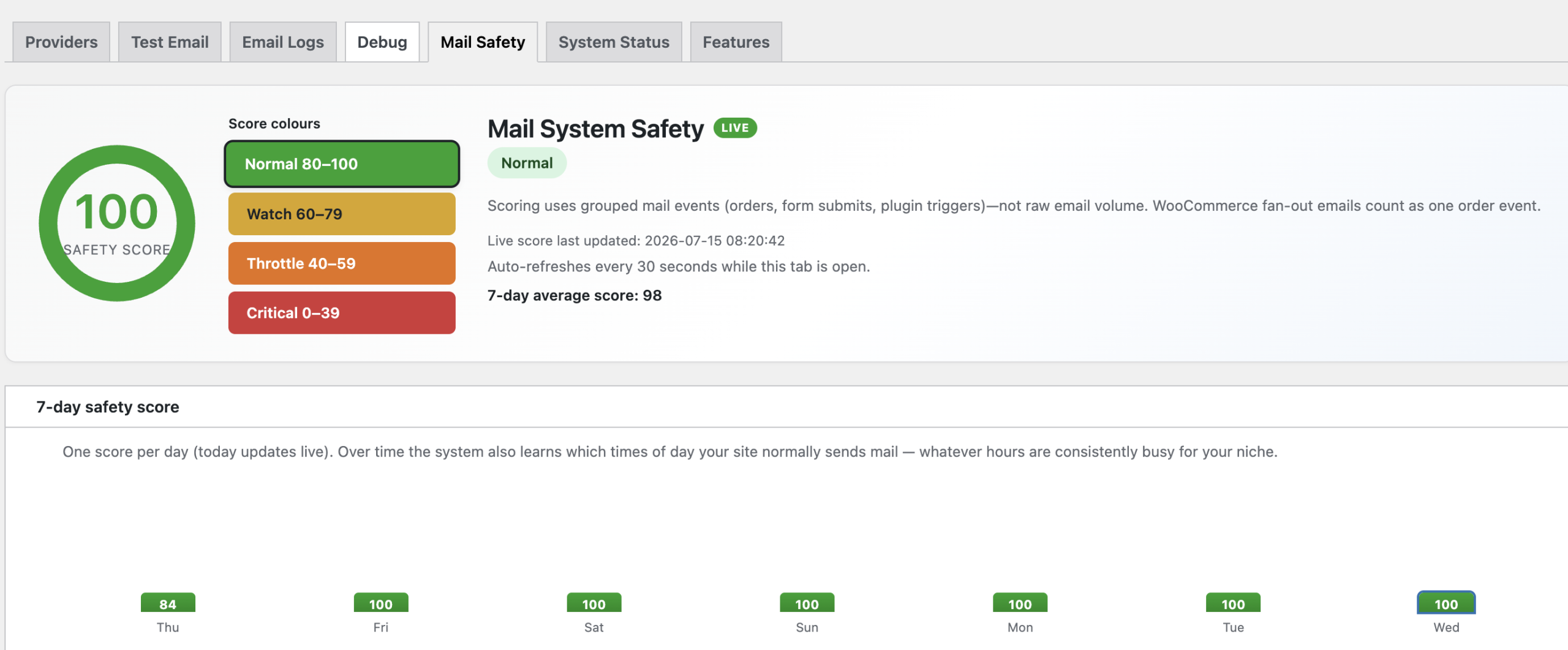
A live safety score from 0–100 helps identify changes in sending behaviour and highlights possible issues.
Smart protection against unusual activity
Mail Safety includes advanced monitoring tools to help detect, understand and manage unexpected email behaviour:
• Normal, Watch, Throttle and Recovery states
• Configurable usage baselines for different email sources
• Learned busy periods based on your website activity
• WooCommerce order burst protection
• Suspicious source detection
• External link monitoring inside emails
• Trusted link approval and whitelisting
• “Why this score” explanations showing the reasons behind score changes
When unusual activity is detected, Mail Safety provides visibility into the source, the cause and the events contributing to the score, helping you investigate quickly and take action before email delivery is affected.
Provider usage monitoring
Stay in control of your email allowances.
Set daily or monthly sending limits for every provider and monitor usage directly inside WordPress.
When a provider approaches its configured limit, the plugin can automatically move delivery to the next available provider in your failover chain.
Powerful troubleshooting tools
When an email fails, you need answers quickly.
The dedicated Debug system records important delivery events including:
• SMTP errors
• API errors
• Connection tests
• Failover attempts
• Provider responses
• Routing decisions
Failures include plain-English explanations alongside technical details to make troubleshooting easier.
Test and verify your email setup
Make sure your email delivery system is ready before a real failure happens.
Test individual providers, run a complete delivery chain test, or simulate a provider failure to verify your automatic failover configuration.
Testing tools include:
• Single provider test emails
• Full failover chain testing
• Provider connection tests
• Simulated primary provider failure
• Live delivery results and provider responses
Confirm that your backup providers are configured correctly and ready to take over when needed.
Built for WordPress professionals
SMTP + Log Viewer & Mail Safety is ideal for:
• WooCommerce stores needing reliable order emails
• Agencies managing multiple websites
• Developers troubleshooting wp_mail issues
• Businesses wanting email visibility without external dashboards
• Websites requiring provider redundancy and failover protection
Stop wondering where your WordPress emails went.
See them, manage them and protect them with SMTP + Log Viewer & Mail Safety.
New: Brevo Blocked Email Failover
Don’t let a blocked Brevo recipient silently break important WordPress emails.
We added automatic handling for blocked/hard-bounce delivery events from Brevo, including 5.1.1 recipient rejections.
This feature came from a real-world problem where an intermittent Microsoft/Exchange rejection caused a known-valid address used for CF7 notifications to become blocked in Brevo.
The website continued accepting form submissions, but the notification recipient was blocked — so enquiries could be submitted successfully while the notification emails failed to arrive.
The same problem can affect WooCommerce. A shop could continue taking orders while an important WooCommerce notification fails because its recipient has been blocked by the SMTP provider.
What the plugin now does
- Detects blocked delivery events from Brevo
- Automatically tries the next configured SMTP provider
- Shows Brevo delivery events and status information in the new provider events tab
- Email logs now show the delivery status, making failures much easier to identify
- Sends an administrator notification when a blocked delivery is detected
- Helps keep important WordPress transactional emails moving
This can protect emails from Contact Form 7, WooCommerce and other WordPress plugins that rely on transactional email.
If you’ve experienced intermittent Brevo → Microsoft/Outlook 5.1.1 failures, this feature was built with exactly that situation in mind.
Reviews
There are no reviews yet.